E-mail: sachikoo_sz@yeah.net
Telephone: +86-13118819569

Views: 0 Author: Site Editor Publish Time: 2026-07-16 Origin: Site


Upgrading workplace communication is no longer just about dial tones. You are integrating voice into a broader, modern workflow. Today's organizations require agile connectivity far beyond physical desks. Relying on outdated legacy systems severely limits remote capabilities. These old setups increase maintenance costs immensely. They also create deep data silos across departments. Over-investing in complex unified communications carries distinct risks too. A poor adoption plan often wastes valuable IT resources. We provide a skeptical, evidence-based framework here. You can systematically evaluate a modern Office Telephone system using our guide. You will learn to shortlist hardware and software based on actual needs. Stop relying purely on vendor hype and marketing materials. Follow these strategic steps to ensure a smooth transition. Your team deserves reliable tools to maintain peak operational efficiency.
Modern office telephone solutions demand a shift from evaluating hardware specs to assessing network readiness, software integrations, and Total Cost of Ownership (TCO).
Choosing between cloud-hosted VoIP, on-premise PBX, or hybrid systems depends entirely on your compliance requirements and remote work policies.
Not all employees need the same hardware; strategically mixing softphones with a traditional corded office phone optimizes both budget and ergonomics.
Successful implementation requires rigorous network testing (Quality of Service) and a phased rollout to mitigate user adoption risks.
You must choose an architecture matching your specific organizational profile. Cloud-based platforms host the PBX software remotely. They route all voice traffic over your existing internet connection. This architecture provides exceptional scalability for growing teams. You can add new user profiles in minutes. The system supports remote teams natively. Remote workers simply log into a mobile application. Providers handle automatic feature updates centrally. You receive predictable per-user licensing statements. This approach shifts expenses directly to operational budgets. However, you face one major vulnerability. Cloud platforms depend entirely on local ISP stability. Calls drop immediately during broadband outages.
On-premise IP-PBX offers a completely different operational model. You host the hardware inside your physical server room. This approach grants maximum control over internal data routing. Highly regulated industries strongly prefer this localized architecture. Healthcare facilities and financial institutions require strict data oversight. You avoid recurring per-user cloud licensing fees entirely. However, the system requires high initial capital expenditures. It also demands significant internal IT overhead. Your team must handle physical maintenance regularly. They must also manage critical security patching.
Map your architecture choice strictly to internal capabilities. Assess your available IT bandwidth realistically. Review your strict compliance mandates closely. Calculate the exact percentage of permanent remote workers. You should never force a cloud solution onto an unstable network. Conversely, do not buy physical servers for a fully remote workforce.
| Architecture Type | Primary Mechanism | Key Advantages | Main Drawbacks |
|---|---|---|---|
| Cloud-Based VoIP (UCaaS) | Internet-routed remote PBX | High scalability, native remote support, automatic updates | Dependent entirely on local ISP stability and bandwidth |
| On-Premise IP-PBX | Physical hardware on site | Maximum data control, no recurring cloud user fees | High upfront capital cost, requires internal IT maintenance |
Organizations often overpay for massive feature bundles. You should focus only on functionalities solving specific operational bottlenecks. Avoid adopting vanity features blindly. Map every software capability to a verifiable business outcome. If a feature lacks a clear use case, ignore it.
Advanced Call Routing & Auto-Attendants: This feature significantly reduces frontline administrative burden. Auto-attendants act as digital receptionists. They ensure clients reach the correct department swiftly. You eliminate endless blind transfers. Customer frustration drops noticeably.
CRM & Helpdesk Integrations (CTI): Computer Telephony Integration generates automated screen-pops. Agents see immediate context before answering calls. Automated call logging reduces average handle times. The customer experience improves instantly. Agents stop asking callers to repeat basic information.
Mobility & Simultaneous Ring: This is often called Find Me/Follow Me functionality. It prevents missed critical communications. The system routes desk phone extensions to mobile applications. Traveling staff maintain perfect continuity. Clients never realize the employee left their physical desk.
Call Analytics & Live Monitoring: Managers gain verifiable data on daily call volumes. They easily identify historical peak interaction times. Live dashboards display current resolution rates. You can optimize staffing schedules efficiently. Guesswork disappears from your workforce management strategy.
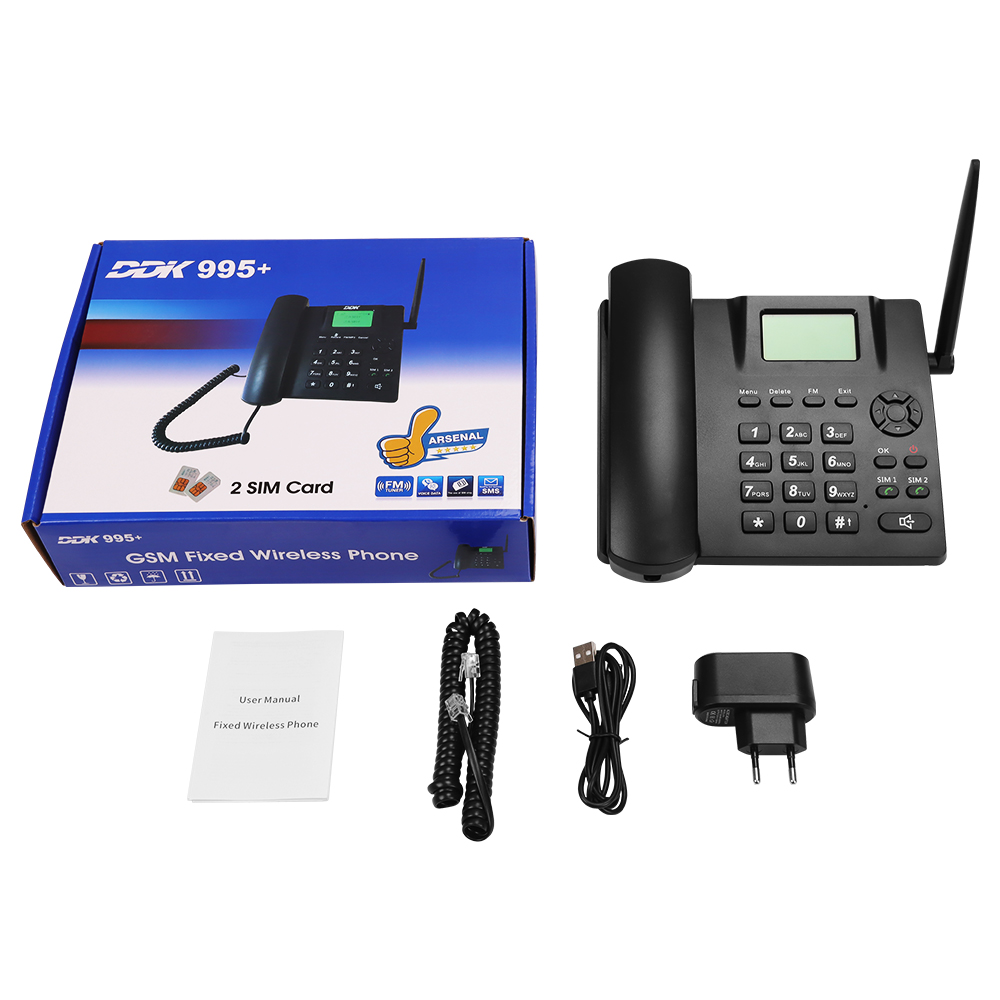
Standardizing hardware across the entire company wastes money. Not all employees need identical communication devices. You should implement a hybrid deployment strategy. Audit individual user personas thoroughly before purchasing hardware. The softphone approach fits specific roles perfectly. It relies entirely on software applications. You install these on computers or mobile devices. This setup works best for remote workers. Sales teams thrive using portable softphones. Highly mobile staff rely on them constantly. However, you must consider peripheral requirements. Softphones require high-quality noise-canceling headsets. The system relies heavily on local device processing power. Older laptops may struggle handling high-definition voice processing.
Physical hardware still dominates specific workplace environments. Receptionists manage massive call volumes daily. Executive desks expect immediate, tactile responsiveness. Manufacturing floors require durable, dedicated communication endpoints. A modern corded office phone provides "always-on" reliability. It operates independently from a computer operating system. Acoustic ergonomics remain vastly superior on dedicated handsets. Users benefit from physical quick-keys. Busy Lamp Field indicators show presence statuses instantly. Software simply cannot replicate these tactile features efficiently. High-volume call centers often depend on this reliability.
Avoid buying physical endpoints blindly. Allocate a physical IP phone only to roles actively benefiting from it. Audit user habits strictly. A hybrid mix optimizes both budget constraints and user ergonomics.
Do not deploy voice over IP blindly. You must conduct a rigorous network assessment first. This is the absolute prerequisite for clear audio. Verify your routers support Quality of Service protocols. QoS prioritizes voice packets over standard web traffic. This prioritization prevents latency and irritating audio lag. A congested network destroys voice quality instantly. Test your bandwidth capacities during peak operational hours.
Demand rigorous security standards from potential vendors. Do not compromise on data protection. Require end-to-end encryption for all voice packets. Vendors must support SRTP and TLS protocols. You should also demand STIR/SHAKEN framework compliance. These regulatory frameworks combat spam calls effectively. They prevent malicious caller ID spoofing.
Verify regulatory compliance carefully if handling sensitive caller data. Healthcare providers must verify HIPAA compliance independently. Technology service providers should seek SOC 2 certification. European data handlers require strict GDPR adherence. Ensure the proposed system supports dynamic E911 routing. Enhanced 911 acts differently on cloud platforms. Emergency services must locate your remote workers accurately during crises. Test these emergency routing features thoroughly.
Calculating real financial impact requires looking past the baseline subscription. Many companies ignore secondary expenses during initial evaluations. You must watch out for hidden deployment charges. Number porting fees can add up quickly. Mandatory proprietary hardware limits future flexibility. International calling rates vary wildly between vendors. Premium support tiers usually cost extra. Compare the upfront cost of hardware purchases against leasing models. Weigh these capital expenses against lifetime subscription values.
Execute a disciplined shortlisting process to avoid buyer's remorse.
Define operational constraints clearly: Outline your exact functional requirements upfront. Require seamless integration into your existing software stack. Determine a hard per-user budget ceiling. Do not settle for partial feature compatibilities.
Request dedicated sandbox demos: Do not rely on guided vendor tours. Sales engineers will only show optimal workflows. Test the administrative portal interface yourself. Try provisioning a new user profile manually. Verify the analytics dashboard functions intuitively.
Check Service Level Agreements closely: Examine the contractual uptime guarantees. Look for financially backed promises. Demand at least 99.99% availability minimum. Understand exactly how the vendor handles unexpected outage compensation.
Implementation requires careful risk mitigation strategies. Plan a phased rollout systematically. Start the deployment within the IT department. Let them uncover initial configuration bugs. Move to the sales team next. Finally, roll out the system company-wide. Assign internal champions everywhere. They drive positive user adoption actively. Document new call-flow operating procedures. Provide brief training sessions for advanced features.
Choosing the right office telephone system requires looking past vendor marketing. You must assess your actual network infrastructure carefully. Evaluate specific user personas objectively. Identify your critical integration needs upfront. A poorly planned transition disrupts daily operations severely. A well-executed upgrade boosts overall team productivity.
Start with a rigorous internal audit of current communication bottlenecks. Complete this before engaging outside vendors. You must dictate the feature requirements actively. Never let the vendor dictate your operational needs. Insist on rigorous security standards and verified uptime guarantees.
Take action immediately. Map out your internal user personas today. Separate your desk-bound employees from highly mobile staff. Download a comprehensive network-readiness checklist. Run preliminary bandwidth tests this week. Prepare your infrastructure before signing any service contracts.
A: Yes. You retain numbers through Local Number Portability. The porting process typically takes one to four weeks. Provide your new vendor with a recent billing statement. They manage the technical transfer entirely. Do not cancel your old service until porting finishes completely. Premature cancellation risks losing your numbers permanently.
A: Modern systems utilize automatic failover routing. The platform detects local internet outages immediately. It routes incoming calls automatically to mobile devices. It can also divert calls to secondary branch locations. You should maintain redundant ISP connections for maximum physical reliability. This prevents total communication blackouts.
A: It depends on your current hardware. Older analog phones require an Analog Telephone Adapter to function. Standard SIP-compliant IP phones often adapt to new providers easily. You simply re-provision the device settings. However, proprietary phones from legacy PBX vendors typically require total replacement. Check hardware compatibility lists early.