E-mail: sachikoo_sz@yeah.net
Telephone: +86-13118819569


Views: 0 Author: Site Editor Publish Time: 2026-11-25 Origin: Site


A hotel telephone allows guests to reach hotel departments through one-touch service buttons. These buttons must connect to the correct extensions and follow clear routing rules. Proper programming improves guest convenience and reduces unnecessary front desk calls.
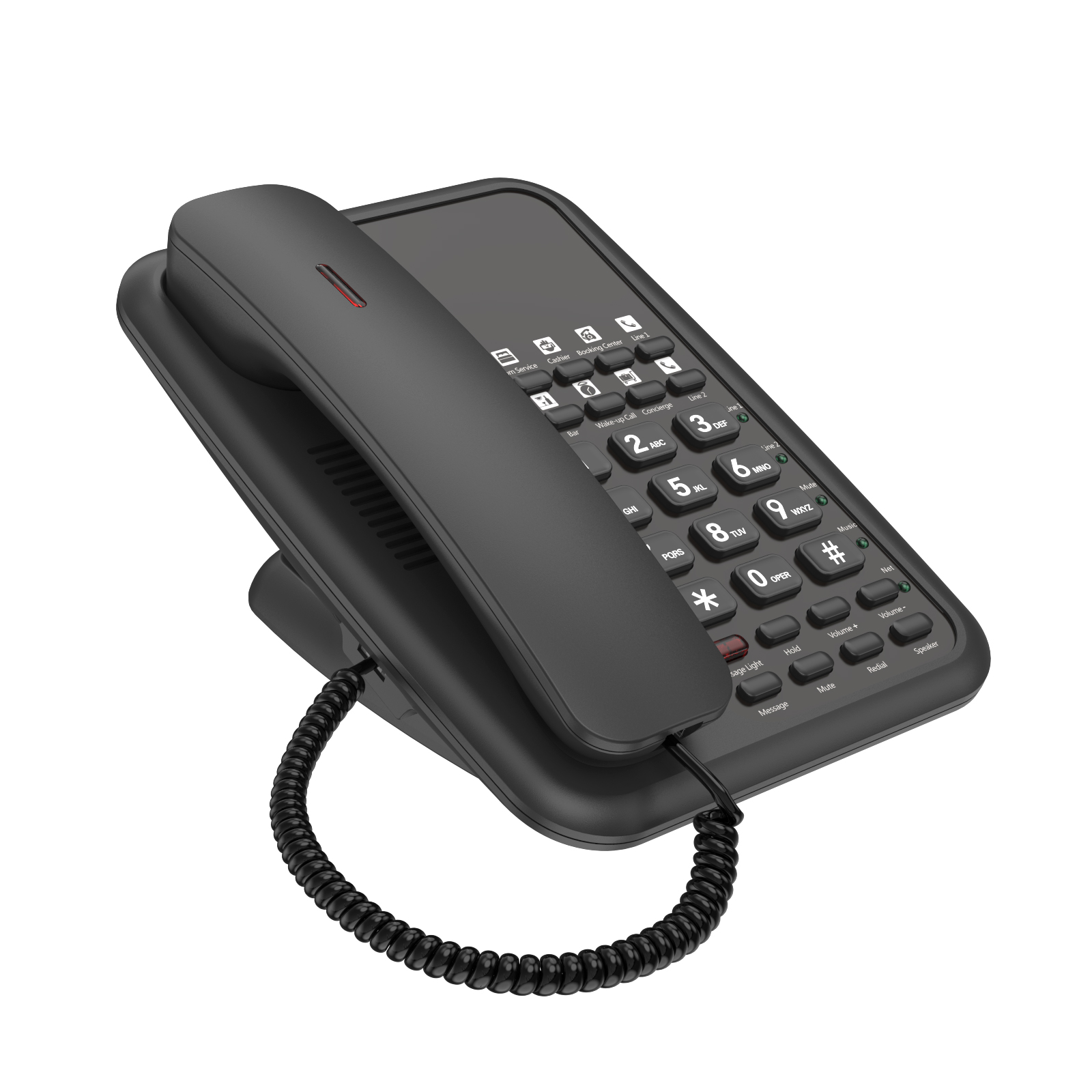
Speed dial programming assigns a destination to a dedicated telephone button. Guests press the button instead of entering an extension manually. Depending on the telephone design, the destination may be stored locally or configured through the hotel's telephone system.
One-touch service keys provide direct access to frequently used hotel services. Common destinations include the front desk, housekeeping, room service, and concierge. Each button represents a predefined number, extension, or supported telephone function.
The number of available keys depends on the handset model. Sachikoo's SN-0005 hotel telephone provides 0–8 one-touch speed dial service keys. Its CPU-controlled design supports stored service information. The product also offers customized LOGO faceplates for different hotel requirements.
Handset memory and PBX configuration perform related but different functions. Handset memory can store a number or extension against a physical key. When guests press that key, the telephone sends the stored dialing sequence.
The PBX controls how the destination is handled after receiving the call. It may connect the call to an extension, department group, or designated service queue. Therefore, programming the button alone does not guarantee correct department routing.
Hotels should confirm both configuration layers before deployment. This distinction prevents situations where a button works technically but reaches the wrong department.
Hotel telephone speed dial programming follows a structured configuration process. The exact button sequence depends on the handset model and telephone system. Most installations require destination planning, key assignment, call routing, and functional testing.
First, identify whether the hotel uses analogue or SIP telephones. Check the PBX model, extension structure, and available programming functions. Confirm whether the speed dial destinations are stored inside each handset or centrally managed.
This step determines the correct programming method. Some handsets support direct memory programming through an authorized setup mode. Others rely on PBX settings or centralized SIP provisioning. Always follow the manufacturer's instructions for the selected model.
Before entering numbers, prepare a clear mapping document. List every physical key, printed label, destination extension, and responsible department. This prevents inconsistent assignments during installation.
A typical hotel speed dial map may look like this:
| Button label | Destination | Function |
|---|---|---|
| Front Desk | Reception extension or queue | General guest assistance |
| Housekeeping | Housekeeping extension or group | Cleaning and room supplies |
| Room Service | Dining service extension | Food and beverage requests |
| Concierge | Concierge extension or queue | Travel and local assistance |
| Operator | Operator extension | General call transfer |
| Emergency | Designated emergency response destination | Urgent assistance |
These destinations are illustrative. Actual extension numbers and emergency procedures must follow the hotel's PBX configuration.
The mapping table should remain consistent across rooms of the same category. Additional buttons can serve special requirements in suites or accessible rooms.
The programming procedure depends on where the telephone stores its destinations. For a handset with local memory, an authorized technician enters the supported programming mode. The technician selects a service key and assigns its corresponding number or dialing sequence.
The telephone then saves the information according to its model-specific procedure. Some products require a confirmation action before leaving programming mode. Others use centralized configuration tools.
For PBX-managed or SIP systems, the administrator assigns the destination through the relevant management interface. The physical button must match the programmed extension or service function.
Do not apply one manufacturer's programming sequence to another model. The exact key combinations, access codes, and saving procedures require the correct user manual.
A speed dial button needs a working destination and a defined call flow. The PBX should determine what happens when the destination is busy or unavailable. It should also provide an appropriate route outside normal department hours.
For example, a housekeeping button may connect to a staffed extension during daytime hours. After hours, the call could transfer to the front desk or an approved service queue. A room service button may follow a different schedule.
These rules should be documented before deployment. Otherwise, guests may hear endless ringing or reach an unattended extension. Clear routing makes the programmed buttons useful throughout the day.
After programming, save the configuration using the supported method. Check the displayed labels against the assigned destinations. Confirm that the stored numbers and extension formats are correct.
Test every button from an actual guestroom telephone. Listen for the expected connection and confirm that the correct department receives the call. Repeat testing across representative room categories and telephone models.
A successful test confirms both the button assignment and the routing behind it. Keep the approved configuration document for future maintenance.

Analogue and SIP systems can provide similar guest service functions. However, their configuration methods and network requirements differ. Hotels should select the programming approach according to their existing infrastructure.
Analogue hotel telephones typically connect through telephone lines to a PBX or analogue telephone adapter. Their speed dial keys may store dialing sequences within the handset. The PBX then interprets those digits and connects the call.
This arrangement can work well in hotels with established analogue cabling. Existing room connections may remain in place during handset replacement. However, technicians must confirm port programming and extension assignments.
Some analogue handsets support local memory programming. Others require specific manufacturer tools or programming procedures. The telephone manual should identify the correct method.
SIP telephones connect through an IP network to a call server or IP PBX. Their programmable keys may be configured through the handset interface or a centralized provisioning platform. The assigned function can include an extension, telephone number, or supported service feature.
Centralized provisioning helps hotels manage multiple rooms. Administrators can apply consistent settings across a group of telephones. Changes can also follow an extension when a compatible handset is replaced.
However, SIP systems require suitable network connectivity and power arrangements. Hotels should also confirm that the selected telephone supports the intended key functions. The configuration must match the installed call server.
Some hotels operate both analogue and SIP telephones. This can happen during phased renovations or property expansions. Different floors may use different telephone generations.
A hybrid system requires consistent guest-facing service assignments. The same printed key should reach the same department across both systems. Administrators must maintain separate technical configurations where necessary.
The mapping document should identify each telephone type and its programming location. This makes troubleshooting easier when different rooms behave differently.
A good speed dial map focuses on guest needs rather than internal department structures. Too many buttons can make a hotel telephone confusing. Clear labels and consistent destinations improve everyday usability.
Start by reviewing the calls received by the front desk. Identify which requests guests make most frequently. These usually provide the strongest candidates for dedicated service keys.
Front desk, housekeeping, room service, and concierge are common examples. Additional destinations should reflect the hotel's actual services. A resort may prioritize recreation bookings, while a business hotel may emphasize business center assistance.
Avoid assigning buttons to departments that rarely receive direct guest calls. Each additional key creates another destination to maintain. A smaller, useful set often provides a clearer guest experience.
The same service should use the same button label throughout the property. Guests should not need to relearn the telephone when changing rooms. Staff should also recognize the same layout across different floors.
Use short and understandable labels. Avoid technical department names that guests may not recognize. Where international guests are common, consider clear wording or suitable icons.
Custom faceplates can help match the telephone with hotel branding. However, printed labels must always reflect the actual programmed destinations. A visually attractive faceplate is ineffective when its buttons are incorrectly assigned.
Every destination should have a clearly identified owner. The mapping document should include the department name and current extension. It should also identify who approves changes.
For example, housekeeping management should confirm its service extension after a department reorganization. The IT administrator can then update the telephone system and corresponding documentation.
This process prevents outdated assignments. It also reduces confusion when technicians replace handsets or modify PBX settings.
Programming is not complete until every destination works correctly. Hotels should test actual calls and review the configuration regularly. A consistent maintenance process prevents small changes from creating larger communication problems.
Test each service key using a working guestroom telephone. Confirm that the correct department receives the call. Check voice quality, connection time, and call termination.
Testing should cover different room categories and telephone models. Do not assume that one successful test represents every floor. Differences in PBX ports or programming may affect individual rooms.
Record the results in a commissioning checklist. Any failed button should be corrected before the room becomes available.
A department may not answer every call immediately. Hotels should verify the configured behavior when extensions are busy or unattended. Calls should reach an approved alternative destination when required.
Test after-hours behavior using the actual department schedule. Confirm that guests do not reach closed service desks. Also check whether urgent calls follow the hotel's designated emergency procedures.
These tests evaluate the complete call flow rather than only the physical buttons.
Hotel departments and extensions can change over time. A new service team may replace an existing department. Telephone configurations must reflect these changes.
Update the handset memory, PBX mapping, or SIP provisioning as applicable. Replace outdated faceplate labels when necessary. Then repeat the relevant call tests.
Housekeeping status codes also require separate documentation. These dialed sequences may communicate room status to a property management system. They should not be confused with guest service speed dial buttons.
Speed dial capability should be included in the procurement specification. Buyers need to confirm hardware features and system compatibility. They should also consider customization and long-term configuration support.
Check how many one-touch buttons the telephone supports. Match this number with the hotel's approved service map. More buttons are not always better if guests rarely use them.
For example, Sachikoo's SN-0005 lists 0–8 one-touch speed dial service keys. The model also offers a customized LOGO faceplate and CPU-controlled operation. Buyers should confirm the required key quantity and configuration with the supplier.
Confirm whether the telephone works with the hotel's existing PBX or SIP platform. Ask the supplier which functions are stored locally and which require system-level configuration. Request the programming manual and technical specifications.
Also check message waiting indication, flash timing, transfer functions, and extension interfaces. These features may affect how the handset works with the installed system. Compatibility should be confirmed for the complete telephone configuration.
Hotel telephone appearance should match the room's interior design. Buyers may request customized faceplates, logos, and button labels. These details should follow the final speed dial mapping document.
Sachikoo provides hotel telephone models with customizable faceplates and one-touch service keys. Its product range includes different key configurations for guestroom applications. Buyers can provide their service map and PBX information before confirming the required model.
A complete purchase specification should include the telephone model, key quantity, destination labels, system type, and programming requirements. This helps manufacturers and hotel technicians coordinate the installation.
Hotel telephone speed dial programming connects physical service keys with stored numbers, extensions, and call routing rules. Hotels should document every assignment, test each destination, and maintain consistent configurations across guest rooms.
Sachikoo www.sachikoo-zace.com offers hotel telephones with customizable one-touch service keys and faceplates. Contact Sachikoo with your PBX requirements and button mapping to discuss a suitable hotel telephone configuration.
A: Assign each key a number or extension using the supported handset or PBX programming method.
A: Yes, when their destinations and call routing are correctly configured.
A: The number depends on guest services and the selected telephone model.
A: Usually, SIP keys need compatible phone or server provisioning.
A: Yes. Authorized technicians can update stored destinations or system configurations.
A: Yes. Selected models provide customizable one-touch service keys.